Roll up the rim to lose


I buy a tea and bagel from Tim Horton’s on my way to work every day. For the last couple of weeks, the Roll up the Rim to Win contest has been going on, and thus far I have won exactly nothing. Last year I won a couple of coffees teas and a couple of donuts — nothing much, but it’s always nice to win something. But does my lack of winning make me get angry and not go to Timmy’s anymore? No, it makes me want to go more because I know the chances of winning are pretty decent and the fact that I haven’t won yet makes me more likely to win the next time. Yes, I know that is absolutely not true, but it sometimes feels true.

So if I win, I want to go back to Timmy’s to win again and if I lose, I want to go back to Timmy’s to try again. They can’t lose. It’s brilliant.

Update: A friend of mine pointed out on facebook that she wins more often when she buys a large. Last time they ran this contest, I bought a large tea every day, and I won a few times. These days I buy a medium every day and haven’t won at all. Coincidence? Hmmmm…

Telecommuting


I’ve worked as Sybase since August 1997, and have been a part-time telecommuter since January 2004. I already worked at home infrequently when the need arose (as did many others in our group), but at that time, my (old) car was around 275,000 km, and I wanted to reduce the mileage I was putting on it so that it would hopefully last a little longer. I asked my boss if I could regularly work at home one day a week (every Friday). He asked his boss who asked the President of the company (who to this day I have never met), and they all OK’ed it on a trial basis. Five years later, I’m still at home every Friday, and sometimes on other days as well. If there is a lot of snow in the forecast, I will generally work from home; in the past, I have had days where it took me two hours to get to work and the same to get home, and wasting that much time (and gas) seems really dumb if I can work at home and avoid it all. I’ve done this for a couple of years now, and I’m sure there have been days where the traffic would have been fine despite the snow, but one day a few weeks ago it was snowy but I didn’t think it was that bad, so I figured I’d brave the weather. Stupid move. It took me a little over two hours to get to work, and then about an hour and a half to get home.

I’ve read a number of articles on telecommuting, and one of the pieces of advice I’ve seen the most often is that you should treat working at home as the same as going to work, meaning that you should sit down and work during your regular office hours, you should have a separate “office” space and not just sit at the kitchen table, things like that. I’ve even read about people who close the door to their “office” and force their family to either call or email if they need him, just as if he were at an external office. This seems a little extreme to me, but it does avoid persistent interruptions. I would love to have a dedicated place in the house where I could work more comfortably than the dining room. We do have an office upstairs, but the desk is so cluttered with stuff that there’s no room for my laptop. If I were to clear off the desk and use that as my telecommuting “office”, I think I’d have to invest in a new chair. Hmmmm…. I’ve thought about that idea in vague terms before but never really thought about it until now, and I’m starting to think that it’s a really good idea.

Treating working at home like working in the office is particularly important if you telecommute 5 days a week, since you don’t want to feel like you live in your office — you want a place that you can “walk out of” at 5:00 and feel like you’re back home. For me, I only work at home one day a week most of the time, so I set my laptop up at the dining room table and sit there. Sometimes I used to sit at the kitchen table, since it’s closer to the entertainment centre so I can plug my iPod in and listen to music while I work. I recently bought a speaker device for my iPod so I can listen in the dining room, so now I don’t need to move. But generally, it’s a normal working day. I get up at the same time, have a shower and get dressed, get the boys breakfast and make their lunches, just like any other day. It’s just that when I’d normally kiss everyone goodbye and leave, I simply walk into the dining room and sit down.

It does take discipline to work at home. It’d be very easy for me to sit with my laptop in front of the TV all day, but I know that I’d get much less (read: nothing) done, so the TV never goes on. Surfing the web is harder to avoid since the browser is right there, but I’m getting pretty good at not sitting on Facebook or writing blog entries all day. Most of the incentive to not do this comes from my work ethic — I know that if I’m goofing around when I’m supposed to be working I’m essentially ripping off the company, and so I feel guilty. I do have to admit that some comes from the fact that working from home is a privilege that Sybase has given me. If they decide I’m not getting as much done when I work from home, they might decide that they don’t want me to do this anymore, and I don’t want to lose the privilege. It’s something like: I want to be able to work from home and goof off, so when I work from home, I don’t goof off in case they don’t let me work at home.

One of the huge advantages of my job, from the point of view of telecommuting, is that from a work perspective, there’s not much I can do in the office that I can’t do from home. (Obviously teachers, policemen, and anyone who works in retail or deals face-to-face with customers doesn’t have this luxury.) Copying large files over the network is much slower (100 Gb line vs. VPN over wireless G). I do a lot of network-related projects, and sometimes that doesn’t work very well. As I’ve mentioned before, the product I work on is a mobile database called SQL Anywhere (SA), and the clients use UDP broadcasts for locating the server. When I’m at home, my machine is essentially on its own private LAN separate from the work one (VPN does stand for Virtual Private Network after all), so any broadcasting stuff doesn’t work properly since UDP packets don’t span subnets. I have a couple of VMWare images running on our VMWare server in the office, so whenever I need to do network stuff, I can simply remote desktop into one of those. I used to do a lot of work on the NetWare version of our product, and I can’t do NetWare stuff at home either. But we don’t support NetWare in the latest version of SA, and we get very few bug reports from previous versions (that’s obviously because my code is robust and efficient, not because we only have a handful of customers using NetWare). I have my NetWare development environment set up on a VM now so I can do that from home anyway.

The obvious advantage to telecommuting is the lack of travel time and effort — not only does it reduce the time spent travelling (on Fridays I generally spend the extra two hours working), but it also reduces the gasoline used and the extra mileage on the car. On days where the traffic or driving conditions are bad, it also eliminates the likelihood of accidents, and lowers my general stress level as well. It’s also very nice to be able to schedule things like dentists appointments and visits from service people (the furnace guy, the guy who will hopefully fix our dishwasher next week so I don’t have to wash a thousand dishes every night, etc.) on Fridays and not have to take vacation days.

Other than work stuff I can’t do from home, the main downsides to telecommuting are things like participation in meetings, whether scheduled or impromptu (Aside: “impromptu” is a really weird word), and socializing. Some things are just more difficult over email or IM.

From the company’s point of view, there are only one real advantage: keeping employees happy (and therefore keeping employees). I do love my job, but if Sybase didn’t allow me to work from home, I might have grown tired of the commute by now and left to find a job closer to home. In terms of job perks, it costs the company nothing, and is a display of trust on their part, further enhancing my overall job satisfaction.

I’ve written before about IvanAnywhere, the telepresence robot in our office controlled by my colleague Ivan Bowman, who lives in Nova Scotia. Ivan used to live and work in Waterloo, and now travels here a few times a year. But I’m curious how Ivan’s working relationship with colleagues that he has never worked with “in person” differs from those with whom he has.
CD Review: Nine Inch Nails – The Slip


I downloaded the new Nine Inch Nails album a week or two ago (for free!). This was my introduction to NIN who are known as “industrial metal”, but as with other labels, I’m not really sure what that means. Similarly, what does it mean for a band to say they are “alternative”? Alternative to what? R.E.M. was the quintessential alternative band for a while, then they sold zillions of CDs and had #1 hits and stuff, so are they still “alternative”? The best description I’ve heard for “alternative” was “Any band that I like that you’ve never heard of”, which fits as well as any other description.

Anyway, back to industrial metal. Those readers familiar with NIN might be shaking their head, but I really have never heard any of their music, so I’m a NIN virgin, please be gentle. I have a couple of Rammstein albums (Feuer Frei! is such a great song), and a few Tool albums as well. NIN has a fair number of time signature changes, moreso than Rammstein though not as much as Tool, and both NIN and Rammstein have songs that have some electronica aspects while definitely having a basic metal sound. Both Rammstein and NIN have a couple of these type of upbeat almost-danceable songs (Discipline, Echoplex, Demon Seed), while the thought of dancing to a Tool song is just laughable.

One similarity among all three bands is that the vocals are frequently hard to decipher. I can safely say that I have no idea what any Tool or NIN songs are about — or Rammstein either for that matter, but that’s because they sing in German. NIN and Tool also have songs with long instrumental stretches. With Tool, the instrumentals are mostly done with actual instruments, while the NIN songs 999,999, Lights In The Sky, Corona Radiata and The Four of Us Are Dying are mostly ambient sounds and minimal actual music. (Then again, the Tool songs Eon Blue Apocalypse and Faaip de Oiad (WTF?) are pretty much just noise too.)

One thing that differentiates NIN is the guitar sound. The guitar in NIN is much “fuzzier”, while Tool and Rammstein use your standard distorted metal guitar. One album by The Tea Party, Transmission, has some songs that feature the same fuzzy distorted guitar sound as NIN, though I wouldn’t generally call The Tea Party industrial or even metal. If you took Tool, swapped out the guitarist’s distortion pedal for a more fuzzy one (or maybe added a few distortion pedals in series), mixed in some of the keyboard fills of Rammstein, and then somehow got the lead singer to cheer the fuck up a little, you’d get NIN.

To confirm what I said before about why free music is a good thing, I bought the older NIN album The Downward Spiral a few days ago, and I’m looking forward to receiving it this week. I just love listening to new music!

I just realized something else though — I bought The Downward Spiral used on eBay, so Trent won’t actually be getting any money from me. But I can’t confirm that the guy I bought it from didn’t rip it and keep a copy on his computer or iPod. So why isn’t Lars Ulrich fighting against the used CD industry?

Sure, but does it have Dolby Noise Reduction?


Gail got a new Walkman last weekend. She wants to do some more walking once the weather gets nicer, so she wanted a new MP3 player. We did some looking around and she decided on the Sony one. Note that the price on the Sony page is $119, but we found it at Future Shop for $79. Gail’s main criteria were that it be small, have a display screen that showed you the song and artist name, and have the ability to use playlists. The playlist idea is so that she can set up a “warmup” playlist, consisting of songs of an appropriate speed for warming up, and then once she’s warmed up and wants to pick up the pace, she can switch to another playlist consisting of faster songs.

The Walkman came with a CD of software, which I presumed was Sony’s equivalent of iTunes. I installed it and it let me browse through the iTunes directory and select directories and files to copy to the Walkman. The docs say that non-MP3 files need to be converted to MP3 format first, but that their software will do that. Well, it seemed to want to convert MP3 files as well (to what, I don’t know), and took forever to do the conversion and copy the files to the device. Then I read in some other part of the docs that you can use Windows Media Player (MP) to create playlists and transfer songs and such instead of the Sony software, so I gave that a try. Holy crap, what a difference. MP is miles faster (in terms of overall application performance), didn’t do any MP3-to-MP3 “conversion”, and lets you create playlists, which the Sony software doesn’t do. Copying the files to the device was also very fast. MP doesn’t handle podcasts (I don’t think), but the Sony software does, so if you want to listen to podcasts, you might have to use the Sony software. But unless you need it, I wouldn’t bother with the Sony software. It did say that it needs MP version 11, but that comes on the CD as well, so if you are not already running MP version 11, you’ll need to upgrade. Vista comes with 11 so I didn’t have to do anything.

As for the actual device itself, well, it ain’t no iPod. While looking around at the store, Gail played with an iPod for a minute or two and said simply “Apple really does it right, don’t they?” Yes, they do, but the iPods were double the price of the Walkman. Gail also liked the look of the Zune, but apparently Microsoft won’t allow the store to use a display model, and we didn’t want to buy it without giving it a try first, so the Zune was quickly dropped. Anyway, I’m very used to my iPod, so it took me a minute to realize that you have to actually press buttons rather than just drag your finger around. But I got used to it pretty quickly, and didn’t have to keep looking down at the buttons to figure out what to do. They say that a good interface is one that “disappears” while you’re using it, so this would have to qualify. The menus and such are similar to the iPod, so you can choose what to listen to based on artist, album, song, and genre (I think), or you can play from a playlist. It seems to have shuffle capability as well.

Now, we haven’t really used the Walkman yet, just played with it a bit and started to get things configured, so time will tell. Maybe after using it for a week, Gail will hate it and we’ll take it back. Or she’ll love it and wonder how she ever lived without it (like I do with my iPod), but more likely, it’ll just be fine. Gail’s not one to fall in love with technology (unlike her husband and his goddamned beloved iPod), so as long as it does the job that it’s supposed to do, everything will be peachy.

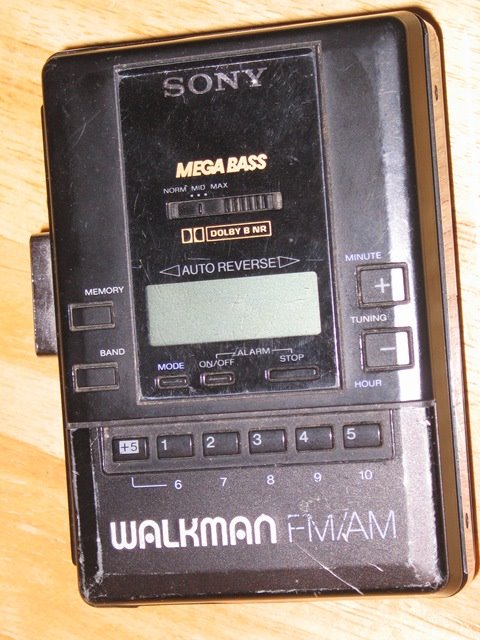
Aside: The image above is one that I found online with a google search, but I chose it because it happens to be the same model as the second Walkman I had in high school. That model was very cool because it had MEGA BASS. It also had Auto Reverse, which was also a very cool feature, but not as cool as MEGA BASS because the first Walkman I had also had auto reverse. MEGA BASS was new. Oddly, my boss has a cassette Walkman in his office, which is the same model as my first Walkman. He does have an iPod which he uses when walking to and from work, so I have no idea what he uses the cassette player for.

The World Baseball Whatever


The second World Baseball Classic is in progress and once again, I just cannot get into it. The idea is great; as a baseball fan, any way to promote baseball around the world is fine by me. But until I looked up the wikipedia entry, I couldn’t remember who won the last one. Off the top of my head, I can’t name more than three members of the Canadian team (Jason Bay and Justin Morneau because they’re awesome and Stubby Clapp because I can’t imagine anyone willingly going by the name “Stubby”).

I did watch a bit of a game earlier today while folding laundry, but I didn’t finish watching it, and did not later feel compelled to find out the final score like I did watching women’s softball during the Olympics. Now maybe that’s because the game I happened to be watching was the Cubans wiping out the South Africans 7-0 in the 5th; if the game had been close, I might have been more interested. Canada plays Italy tomorrow night with the winner advancing to the next round and the loser going home, so I may check that game out, but I wouldn’t be too surprised if it slips my mind.

It would be different if this was a competition featuring the best baseball players in the world, but it’s not. It’s a competition featuring the best baseball players in the world who aren’t injured, weren’t injured last year, didn’t have off-season surgery, whose teams allowed them to play, and who give a damn about this tournament. When players like Halladay, Pujols, Beltre, Santana, Papelbon, Lincecum, and Dempster are all skipping it so that they don’t miss spring training, you can tell the level of interest in this tournament. I don’t remember many American basketball players or Canadian hockey players who have passed on the Olympics for any reason other than they were physically unable to play.

It’s pretty simple, really — if the best players in the game don’t care about the tournament, why should I?

Next morning update: I totally forgot about this game last night. Turns out that this might have been a good idea since Canada lost.

Mid-season NLL report


We’re halfway through the NLL season, and it’s time to look over my pre-season predictions and celebrate the fact that I was 100% bang-on with all of my predictions. Well, almost.

East Division
  Predicted Actual
 1  Buffalo Buffalo
2 Philadelphia Boston
3 New York New York
4 Toronto Philadelphia
5 Rochester Rochester
6 Boston Toronto
West Division
  Predicted Actual
 1  Minnesota Calgary
2 Calgary Portland
3 Colorado Colorado
4 San Jose Minnesota
5 Portland San Jose
6 Edmonton Edmonton

OK, not almost. I got a few right, but in some cases, I’m not even close. In the East, it’s hard to get Buffalo wrong, I had New York contending, and Rochester near the bottom, but that’s about it. Philly didn’t weather the loss of Iannucci very well at all, and my fairly dire prediction for Toronto turned out to be really optimistic. I didn’t have high hopes for Boston, but they’ve turned out to be much stronger than I thought. I did say in my original prediction that they would be stronger than your average expansion team, but for some reason that didn’t get reflected in how I viewed the standings.

In the West, Minnesota hasn’t been the powerhouse I thought they might be, and Portland is not sucking. I got Calgary and Colorado pretty much right, and Edmonton is no surprise.

But in the East, if you swap Boston and Philadelphia in the standings, you get something very close to my prediction. In the West, if you swap Minnesota and Portland, same thing.

Note for the record that I made end-of-season predictions, not mid-season. There’s lots of lacrosse still to be played.

What if we give it away?


Hot on the heels of Harvey Danger making their album available for free download (which I’ve blogged about a couple of times), Nine Inch Nails have done the same thing. OK, well maybe not “hot on the heels”, since Harvey Danger did it over three years ago, but this is another example of a band (or person actually, since NIN is Trent Reznor) that actually gets it when it comes to downloading music.

A lot of people and bands (Lars Ulrich of Metallica comes screaming to mind here) seem to think that downloading music is the scourge of society, and allows people to essentially pull money from their pockets. What they have to consider is that many of the people downloading their music illegally wouldn’t have bought it in the first place. Would I have gone out and bought a Harvey Danger CD? No, because I’d never heard of the band, but I’m willing to download it and listen for free. If it sucks, I’ve lost nothing. But if I like it, I’m more likely to go back and buy it or some previous album (both of which I did for Harvey Danger), which is money that the band made that they wouldn’t have otherwise.

Are there people who will download music instead of buying it? Absolutely. Back in high school, my friends and I would all negotiate who was going to buy the latest album from Kim Mitchell or Van Halen or whoever, and everyone else would give that person a blank tape and he’d tape it for the rest of us. So yes, we were pirating music. But at the time, I was a high school kid and didn’t have much money anyway, so I was unlikely to buy 90% of the albums I taped, meaning that nobody was losing money by me doing this. On the contrary — while I may not have bought Akimbo Alogo at the time, I did listen to it and became a Kim Mitchell fan. Years later I did buy Akimbo Alogo on CD, along with a couple of other Kim Mitchell albums as well as all of the Max Webster albums, so Kim did end up benefitting from my piracy.

Similarly, I’ve been interested in hearing NIN for a while, but since I’d never actually heard any of their music, I was hesitant to just go out and buy something. Downloading the album gives me the chance to hear it and decide if I like it, and so far I do. So perhaps I’ll buy some of their older stuff — once I do that, NIN will profit from my downloading their album. If they never released it for download, I wouldn’t have bought it, and they’d have made nothing from me. Thus far, since I haven’t bought any NIN stuff, they still haven’t made anything from me, but now the potential’s there.

Let me be clear: I may have done it in the past and even tried to justify it above, but I’m not advocating piracy, so chill out, Lars. I do have a handful of albums that I downloaded illegally a couple of years ago (none of which are Metallica, so chill out, Lars), and I feel a little guilty every time I listen to them. But I have bought copies of several of the ones I listen to often (I just bid on a copy of Abbey Road and two Rammstein CDs on eBay), and I’ve also deleted some that I don’t. I haven’t downloaded any music or videos (other than the odd TV show that I missed, none of which feature Metallica, so chill… OK, that joke’s getting old) in a couple of years. I’m really not talking about stealing music, I’m talking more about the bands that choose to make their music available for download, most of which are indie bands like Harvey Danger. But it’s nice to see some big-name bands like NIN doing the same thing.

Steve Gibson needs a blog


Steve Gibson needs a blog. Seriously. I’ve been listening to his Security Now (SN) podcast for over a year, and I do enjoy it, but it seems to be getting longer and longer every week, mainly because of things that Steve and Leo start talking about that are not security-related.

I’m in the middle of episode 184 now, which is a Q&A episode. This is where Steve picks twelve questions from listeners and answers them. This episode is about an hour and fifty seven minutes long. The first question isn’t even begun until forty two minutes into the podcast. Some of the topics discussed before the first question:

  • a minute of advertising for the TWiT network.
  • seven minutes of introduction and talking about Steve’s appearance on another TWiT podcast next week regarding historical computers (PDP-8, PDP-11, and such)
  • two minute commercial
  • ten minutes of recent security news. He mentioned the Pirate Bay trial as well as an authentication problem he had with Paypal. Definitely security-relevant.
  • seven minutes of talking about a couple of computer utilities he uses, his favourite sci-fi TV shows (Fringe is his current favourite, if you’re wondering), more on historical computers, and how he maps his Caps Lock key to Ctrl because Caps Lock is not very useful. Can’t disagree there.
  • a seven-minute Spinrite “testimonial”, i.e. commercial. He does one of these every week, and I’m sure this is one of the reasons he does SN — it lets him plug his software. Again, no big deal since I skip it anyway, other than the fact that it was very long.
  • four minutes on how Steve’s computer plays a “Yabba Dabba Doo!” sound whenever someone buys a copy of Spinrite, and how the number of times he hears this sound is inexplicably higher during the recording of SN than at other times. The only explanation that he and Leo have come up with is that some people like to buy Spinrite while SN is being recorded so that they can hear the sound bite for their purchase (you can listen to the podcast being recorded live at twit.tv on Thursday afternoons). This was kind of funny, actually.
  • two minute commercial
  • two more minutes on the Yabba Dabba Doo thing and other sound bites that Steve’s computers play

The twelve questions take an hour and 15 minutes or so to read and answer, with at least one more two-minute commercial in there. This seems pretty long too, but this is the actual meat of the show, so I can’t complain too much about that. There are some questions that could be answered a little more succinctly though.

Leo starts to read the first question at the 42:00 mark. Some of that 42 minutes was commercials, evil but necessary. Twelve minutes seems a little long though — the Spinrite commercial testimonial should be kept to three minutes. The security news section is part of why I listen to this podcast, so that’s definitely fine. I get that Steve and Leo have interests outside of security, but there’s twenty minutes of just general banter. If you guys want to shoot the shit, do it before recording.

If Steve had a blog, he could ramble on all he wanted about Fringe and sci-fi in general, and old computers, and his Yabba Dabba Doo sound bite, and his network setup, and his Kindle, and his favourite kind of coffee that he drinks seven times a day, and the fact that he gets his first coffee at Starbucks at 5:30 in the morning, and how he writes everything in assembly language, and so on. He could spend thirty seconds per episode plugging his blog and spend the rest of the podcast on actual security stuff. stevegibson.com seems to be taken by an organic farm in Texas, but perhaps he could pull a Dvorak and get gibson dot org slash blog.

Update: For some reason, this particular article has gotten a lot of comment spam, so I have had to disable comments on it. Apologies for the inconvenience.

Sushi IS for dummies?


We were in a bookstore yesterday, when I saw a book in the ubiquitous “… for Dummies” series called “Sushi for Dummies”. Ryan saw it and said that a friend of his liked sushi. I asked “You know who else likes sushi?”, expecting him to say “who?”, at which point I’d say “me”, but his response made me laugh:

“Dummies, I suppose.”

Technical Debt


Jeff Attwood wrote an article on his blog Coding Horror yesterday all about paying down your technical debt. This is when you do something “the quick and dirty way”, which then costs you “interest” in the future in terms of bug fixes, workarounds when new functionality is needed, and just extra time for developers unfamiliar with the code to understand why something was done the way it was. There are certainly times in every developer’s life when you have a choice between doing something “the right way”, which might take weeks to design and implement properly, or you could do it the easy way, which gets the job done for now, but may have consequences later. If you’re under a tight deadline, often the easy way wins out — that’s your debt.

People often complain about Microsoft Windows being bloated, and that’s largely because of technical debt that they can’t easily pay off. When they released Windows NT in 1993, they made sure that all existing Windows and DOS programs would still run. That decision saved them — who’s going to upgrade to a brand new OS when there are no programs and drivers for it, and none of your existing stuff will work? — but they incurred a huge debt because of it. Backwards compatibility has always been a huge issue for Microsoft — it’s only recently (2007) that they released an OS (Vista) that won’t run 16-bit DOS software from the 80’s. I cannot imagine how much of the Windows source code is dedicated to running legacy software.

I love this “technical debt” metaphor, as we’ve gone through it a couple of times on our mobile database product, SQL Anywhere, most notably a few years ago on SQL Anywhere version 10.

One of the advantages of SQL Anywhere is the way we save data in the database file. We do it in such a way that a database created on any supported platform can be copied and used on any other supported platform. Also, if you create your database with one version of our product, you can continue to use it when we release updates for that version, or even completely new versions. Version 9.0.2 of our server, released in 2005, can still run databases created with Watcom SQL 3.2, released in 1992. I remember my time as an Oracle DBA – every time we upgraded Oracle, we had to “fix” the database, and by “fix” I mean we had to rebuild it or upgrade it or something. I don’t remember what we had to do, but we had to do something. We also had Oracle on our test server, which was a different platform than the production server, which means that we couldn’t just copy the production database to our debug server for testing or debugging purposes, which was quite a pain.

Anyway, while this was a very convenient feature, we did accrue some “technical debt”. This is not quite the same as described above, in that we never took the “quick and dirty way”, but we still had to have code in the server to support features that had been removed from the product and very old bugs that had long been fixed. After six major versions and thirteen years, there was a lot of these. After much discussion, we decided to take the big plunge with the 10.0 release (known internally as “Jasper” — the last few releases have all had code names from ski resorts, “Aspen”, “Vail”, “Banff”, “Panorama”, and the next one is “Innsbruck”), since we were adding a ton of other new functionality with that release. The decision: version 10 servers would not run databases created with version 9 or earlier servers. Everyone would have to do a full unload of all their data and reload it into a new database when upgrading to version 10, and they’d have to do this for all their databases. This would allow us to remove thousands of lines of code from the product, making it smaller, and since we have far less cases of “what capabilities does this database have?”, the code can be more efficient. As a simple example, we now know every database that the server can run supports strong encryption, checksums, clustered indexes, and compressed strings, among others, so we don’t need to check for those capabilities before using them. There are a lot more assumptions we can make about the layout of the database that makes the code simpler, smaller, and more efficient. We can also add new features that might have clashed with old databases. We knew that the rebuild itself might be inconvenient, and upgrading to version 10 wouldn’t be nearly as seamless as previous upgrades, but we also knew that once the initial pain of the rebuild was over with, life would be much better for everyone. We even put a lot of work into streamlining the rebuild process so that it was as fast and simple as possible.

As you can imagine, there was some resistance to this, and I’m sure product management had to handle more than one call from a customer asking “I have to do what with my multi-terabyte database?”, but to their credit, they stuck to their guns and told the customers that yes, we know it’s inconvenient, but it’s really for the best, and you’ll appreciate it once the rebuild is done. Or perhaps they blamed it on us, telling the customers “We know it’s a pain, but engineering won’t budge. They’re determined to do this.” Either way, it happened, and we did get some more bug reports because of problems with the rebuilds, but for the most part, things went pretty well. That pain paid off the technical debt that we’d accumulated over the previous decade.

Of course, we’ve since released version 11, which added new stuff to the database file, and we’re working on version 12 which adds even more, so now some of those “if the database file has this capability, then do something, otherwise do something else” conditions are creeping back into the product. So far, there aren’t a ton of them, so our current interest payments are pretty low, but perhaps in five or six more versions we’ll have accumulated enough technical debt that we’ll have to bite the bullet and pay it off again.